
Merge subtitle screenshots into one long image
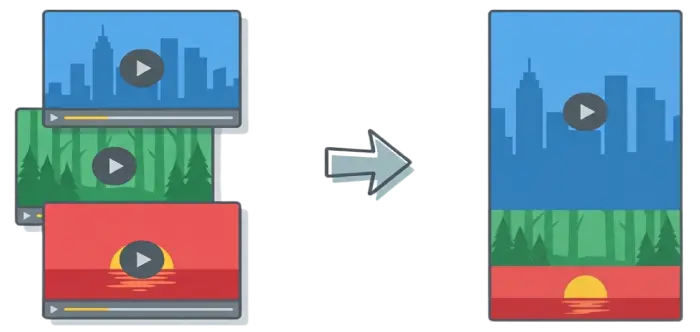
Upload screenshots from movies or videos, adjust the visible area for each image, and combine them into a single long image. Processed locally in your browser; no account required.
Upload Image
• Drag & Drop
• Click to Upload
• Paste
Maximum 50 images
Maximum 10MB per image
Core Features
Subtitle-Focused Image Stacking
Designed specifically for movie and video screenshots. First image shows the full frame, following images reveal only subtitle areas.
Pure Front-End Processing
No server uploads. No image storage. No account required. All processing happens locally in your browser.
Real-Time Preview (WYSIWYG)
What you see is exactly what you export. No trial-and-error exports. Accurate size and layout control.
Flexible Editing Controls
Order adjustment, Full/Stacked modes, fine-grained height control. Unified global settings for borders.
High-Quality Export
Export PNG, JPG, or WEBP with high-quality and 2x resolution available to everyone. No forced watermark.
How to Use
Step 1: Upload Screenshots
Drag and drop images or click to upload. Supports JPG/PNG/WEBP. Auto-sorted by timestamp.
Step 2: Preview Layout
First image full, others stacked. Real-time preview matches export.
Step 3: Edit Images
Move images, switch Full/Stacked modes, adjust stack height individually.
Step 4: Global Settings
Adjust alignment, borders, and signatures.
Step 5: Export
Download as JPG, PNG, or WEBP. High resolution available.
FAQ
Is this tool really free?
Yes! SubtitleStitch is 100% free with no hidden fees, no account required, and no limits on usage.
Are my images uploaded to a server?
No. This is a pure front-end tool. All images are processed locally in your browser and never uploaded.
Do I need to create an account?
No account is required. Every feature is free to use.
Why is only the first image fully visible?
By default, the first image is fully visible to provide full context. The rest are in overlay mode (stack mode) by default, optimized for subtitle screenshots. However, you can manually toggle any image (except the first one) between full visible mode and overlay mode using the toggle button on each image.
How many images can I upload?
You can upload up to 50 images per stitch.
Is there a daily export limit?
No. There is no daily export limit.
Will exported images lose quality?
No forced quality downgrade. High quality and 2x export are available to everyone.
Does this work on mobile devices?
Yes. The interface is responsive and works on mobile, though desktop provides the best editing experience.
Can I upload videos directly?
No. Please take screenshots from videos and upload the image files.